Showing posts with label Java. Show all posts

Thursday, May 1, 2014

User Defined Exception In Java


/* 
Contributed by Anonymous :: Blog is not responsible for any copyright claims 
*/

import java.util.Scanner;
class Xception extends Exception
{
                int detail;
                Xception(int a)
                {
                        detail = a;
                }
                public String toString()
                {
                        return "Xception [ " + detail + "]";
                }
}
class Xceptiondemo
{
        static void compute(int a) throws Xception
        {
                System.out.println("called compute ("+a+")");
                if(a>10)
                        throw new Xception(a);
                System.out.println("Normal exit");
        }
        public static void main(String [] args)
        {
                try
                {
                        compute(1);
                        compute(20);
                }
                catch(Xception e)
                {
                        System.out.println("Caught"+e);
                }
        }
}


Sunday, March 30, 2014

Change random image,background and font using Java Applet


import java.awt.*;
import java.awt.event.*;
import java.applet.*;
import java.util.Random;
/*<applet code=app1 width=300 height=300></applet>*/
public class app1 extends Applet implements ActionListener{
                Button b1,b2,b3;
                boolean a,b,c;
                Random r = new Random();
                Image img[] = new Image[3];
                static int z=0;
                static int m=0;
                Font f[] = new Font[2];
                public void init(){
                                setBackground(Color.blue);
                                b1=new Button("change bg");
                                b2=new Button("change img");
                                b3=new Button("change font");
                               
                                 b1.addActionListener(this);
                                 b2.addActionListener(this);
                                 b3.addActionListener(this);
                                add(b1);
                                add(b2);
                                add(b3);
                                String str;
                               
                                img[0] = getImage(getDocumentBase(),"1.jpg");
                                img[1] = getImage(getDocumentBase(),"2.jpg");
                                img[2] = getImage(getDocumentBase(),"3.jpg");

                                f[0]= new Font("Impact",Font.PLAIN,14);
                                f[1]= new Font("Dialog",Font.PLAIN,24);

                        }
                public void paint(Graphics g){
                                                b1.setFont(f[m]);
                                                b2.setFont(f[m]);
                                                b3.setFont(f[m]);
                                g.drawImage(img[z],20,20,200,200,this);
                                if(a==true){
                                                Color c[] = {Color.red,Color.blue,Color.orange,Color.black,Color.pink};
                                                int k = r.nextInt(5);
                                                setBackground(c[k]);
                                        }
                                if(b==true){
                                               
                                                z=r.nextInt(3);
                                                g.drawImage(img[z],20,20,200,200,this);
                                        }
                                if(c==true){
                                                m=r.nextInt(2);
                                                b1.setFont(f[m]);
                                                b2.setFont(f[m]);
                                                b3.setFont(f[m]);

                                        }

                        }
                public void actionPerformed(ActionEvent e){
                                if(e.getSource()==b1){
                                        b=false;
                                        a=true;
                                        c=false;
                                        repaint();
                                }
                                if(e.getSource()==b2){
                                                                        a=false;
                                                                        b=true;
                                                                        c=false;
                                                                        repaint();
                                }
                                if(e.getSource()==b3){
                                                a=false;
                                                b=false;
                                                c=true;
                                                repaint();
                                        }
                        }
        }


// OUTPUT

Tuesday, March 25, 2014

Colorful Bouncing Ball using Java applet


import java.awt.*;
import java.awt.event.*;
import java.applet.*;

/*<applet code="bb" width=500 height=400></applet>*/

public class bb extends Applet implements Runnable {
  int x,y,dx,dy,diam,sizex,sizey;

  public void init() {

    sizex=Integer.parseInt(getParameter("WIDTH"));
    sizey=Integer.parseInt(getParameter("HEIGHT"));

    x=(int)(Math.random()*1000)%sizex;
    y=(int)(Math.random()*1000)%sizey;

    dx=dy=5; diam=20;

setBackground(Color.black);
   (new Thread(bb.this)).start();

  }

  public void run() {
    while (true) {
      try {
        Thread.sleep(50);
      }
      catch (InterruptedException e) {};

      x+=dx; y+=dy;
      if ((x<=0)||(x+dx+diam>=sizex))
      dx=-dx;
      if ((y<=0)||(y+dy+diam>=sizey))
      dy=-dy;

      repaint();
    }
  }

  public void paint(Graphics g) {

    g.setColor(new Color((int)(Math.random()*1000)%254,(int)(Math.random()*1000)%254,(int)(Math.random()*1000)%254));
g.fillOval(x,y,diam,diam);

  }
}

Monday, March 24, 2014

Twinkling Stars using Java Applet


import java.applet.Applet;
import java.awt.*;
import java.awt.event.*;
/*<applet code="Star" width=600 height=600></applet>*/
public class Star extends Applet implements ActionListener,Runnable
{
Thread t;
Button b1,b2,b3,b4;
TextField tf1,tf2;
Label l1,l2;
Font f;
public void init()
{
setBackground(Color.black);
l1= new Label("speed");
l2 =new Label("No. of stars");
f=new Font("Arial",Font.BOLD,20);
l1.setFont(f);
l2.setFont(f);
l1.setBackground(Color.white);
l2.setBackground(Color.white);
tf1= new TextField(6);
tf1.setFont(f);
tf2 = new  TextField(6);
tf2.setFont(f);
b1 = new Button("start");
b2 = new Button("kill");
b3 = new Button("pause");
b4 = new Button("Resume");
b1.setFont(f);
b2.setFont(f);
b3.setFont(f);
b4.setFont(f);
b1.addActionListener(this);
b2.addActionListener(this);
b3.addActionListener(this);
b4.addActionListener(this);
add(l1);
add(l2);
add(tf1);
add(tf2);
add(b1);
add(b2);
add(b3);
add(b4);
}
public void actionPerformed(ActionEvent ae)
{
if((ae.getSource()==b1)&&(t==null))
{
t = new Thread(this);
t.start();
}
else if((ae.getSource()==b2)&&(t!=null))
{
t.stop();
t=null;
}
else if((ae.getSource()==b3)&&(t!=null))
{
t.suspend();
}
else if((ae.getSource()==b4)&&(t!=null))
{
t.resume();
}
}
public void run()
{
while(true)
{
repaint();
try{
Thread.sleep(Long.parseLong(tf1.getText()));
  }catch(InterruptedException ie)
  {
}
}
}
public void paint(Graphics g)
{
for(int i=0;i<Integer.parseInt(tf2.getText());i++)
{
g.setColor(new Color(((int)(Math.random()*1000))%254,((int)(Math.random()*1000))%254,((int)(Math.random()*1000))%254));

star(g,((int)(Math.random()*1000))%600,((int)(Math.random()*1000))%600);
}
}
static void star(Graphics g,int x,int y){
Point[] points = new Point[9];
points[0] = new Point(28+x, 5+y);
points[1] = new Point(27+x, 21+y);
points[2] = new Point(13+x, 24+y);
points[3] = new Point(27+x, 27+y);
points[4] = new Point(28+x, 41+y);
points[5] = new Point(31+x, 27+y);
points[6] = new Point(42+x, 24+y);
points[7] = new Point(31+x, 21+y);
points[8] = new Point(28+x, 5+y);
int i;
for (i=1; i<points.length; i++)
g.drawLine(points[i-1].x, points[i-1].y, points[i].x, points[i].y);
}

}


simple calculator using java applet

import java.awt.*;
import java.applet.*;
import java.awt.event.*;
public class calc extends Applet implements ActionListener
{
Label l1,l2,l3;
TextField t1,t2,t3;
Button add1,sub,mult,div;
public void init()
{
l1=new Label("first no.:");
add(l1);


t1=new TextField(10);
add(t1);

l2=new Label("2nd no.:");
add(l2);

t2=new TextField(10);
add(t2);

l3=new Label("Result:");
add(l3);


t3=new TextField(10);
add(t3);


add1=new Button("+");
add(add1);
add1.addActionListener(this);


sub=new Button("-");
add(sub);
sub.addActionListener(this);

mult=new Button("*");
add(mult);
mult.addActionListener(this);

div=new Button("/");
add(div);
div.addActionListener(this);


}

public void actionPerformed(ActionEvent ae)
{
if(ae.getSource()==add1)
{
int sum=Integer.parseInt(t1.getText()) + Integer.parseInt(t2.getText());
t3.setText(String.valueOf(sum));
}

if(ae.getSource()==sub)
{
int sub=Integer.parseInt(t1.getText()) - Integer.parseInt(t2.getText());
t3.setText(String.valueOf(sub));
}


if(ae.getSource()==mult)
{
int mul=Integer.parseInt(t1.getText()) * Integer.parseInt(t2.getText());
t3.setText(String.valueOf(mul));
}


if(ae.getSource()==div)
{
int div=Integer.parseInt(t1.getText()) / Integer.parseInt(t2.getText());
t3.setText(String.valueOf(div));
}

}

}
/*
<applet code="calc" width=200 height=200>
</applet>
*/


Monday, March 10, 2014

Anonymous class in Java

//Anonymous class
class outer{
int x=80;
public void display(){
System.out.println("i am in outer class ");
}
}
class inner{
int y=60;

outer out=new outer(){
public void display(){
System.out.println("i am in inner class "+x);
System.out.println("i am in outer class "+y);
}
};
}
class inmain{
public static void main(String arg[]){
inner in=new inner();
in.out.display();

}
}

OUTPUT

Java program to copy one directory filres to another directory

import java.io.*;
class dirfile{

      public static void main(String arg[])throws IOException{
  BufferedReader br=new BufferedReader(new InputStreamReader(System.in));
  System.out.println("entre the location ");
  String s1=br.readLine();
  System.out.println("entre the  new location ");
  String s2=br.readLine();
File f1=new File(s1);
   File f2=new File(s2);
   copy(f1,f2);

  }
public static void copy(File f1,File f2)throws IOException{
                if(f1.isDirectory()){
    if(!f2.exists()){
                       f2.mkdir();
}
                       String f[]=f1.list();
                            for(int k=0;k<f.length;k++){
             File f3=new File(f1,f[k]);
             File f4=new File(f2,f[k]);
             copy(f3,f4);
 }
 }
 else{
  FileInputStream fis=new FileInputStream(f1);
  FileOutputStream fos=new FileOutputStream(f2);
                  PrintStream fs=new PrintStream(fos);
int ch;
                byte []b=new byte[1024];
                while((ch=fis.read(b))!=-1){
                  fs.write(b,0,ch);
                   }
  }
}
}


OUTPUT


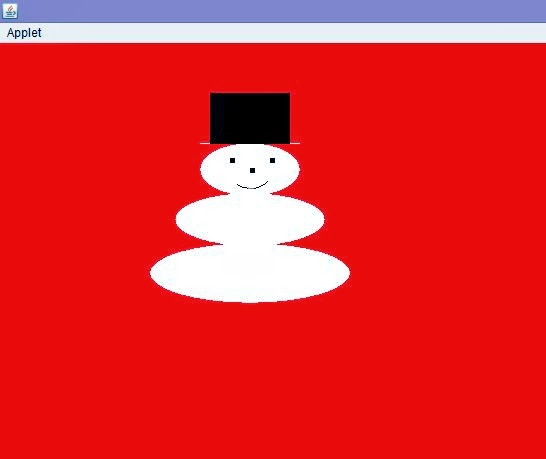
Snowman using Java Applet

import java.awt.*;
import java.applet.*;
public class appletimg extends Applet
{
public void paint(Graphics g)
{
setBackground(Color.red);
//setForeground(Color.white);
g.setColor(Color.white);
        g.fillOval(150,200,200,60);
        g.fillOval(175,150,150,53);
        g.fillOval(200,100,100,53);
        g.fillRect(200,100,100,1);
         g.setColor(Color.black);
        g.fillRect(210,50,80,51);
        g.setColor(Color.black);
g.fillRect(230,115,5,5);
g.fillRect(270,115,5,5);
g.fillRect(250,125,5,5);
g.drawArc(230,115,40,30,230,100);
}
}
/*<applet code="appletimg" width=500 height=500></applet>*/

OUTPUT

Saturday, March 8, 2014

Indian Flag using java applet


/*How to make indian Flag using applet*/
import java.awt.*;
import java.applet.*;
public class Flag extends Applet
{
public void paint(Graphics g)
{
g.fillOval(60,450,120,50);
g.fillRect(110,60,10,400);
g.setColor(Color.red);
g.fillRect(120,80,150,30);
g.setColor(Color.white);
g.fillRect(120,110,150,30);
g.setColor(Color.green);
g.fillRect(120,140,150,30);
g.setColor(Color.black);
g.drawRect(120,80,150,90);
g.setColor(Color.blue);
g.drawOval(180,110,30,30);
int a=0;
int x=195,y=125;
double x1,y1;
double r=15;
double d;
for(int i=1;i<=24;i++)
{
d=(double)a*3.14/180.0;
x1=x+(double)r*Math.cos(d);
y1=y+(double)r*Math.sin(d);
g.drawLine(x,y,(int)x1,(int)y1);
a+=360/24;
}
}
}
/*<applet code ="Flag" width=1368 height=678></applet>*/


//credits : Priyanandan Alok , KIIT University

Sunday, March 2, 2014

Compare two strings in java

import java.util.Scanner;
class reg2{
public static void main(String []arg){
String a2 = null;
String b2 = null;

Scanner sr = new Scanner(System.in);
System.out.print("Enter first string :: ");
a2 = sr.nextLine();
System.out.print("Enter second string :: ");
b2 = sr.nextLine();

if(scheck(a2,b2)==1)
System.out.println("strings \""+a2+"\" and \""+b2+"\" were matched");
else System.out.println("sorry , strings \""+a2+"\" and \""+b2+"\" were unmatched");
}
static int scheck(String a,String b){
int a1 = a.length();
int b1 = b.length();
int i=0,j=0;

if(a1<b1){
String temp = a;
a = b ;
b = temp ;
int t = a1;
a1 = b1 ;
b1 = t ;
}

while(j!=b1){
while(i!=a1){
if(a.charAt(i)==b.charAt(j)){
i++;
j++;

if(j==b1){
return 1;
}
}
else {
i++;
j=0;
if(i==a1)
return 0;
}
}
j++;
}


return 0;
}
}


OUTPUT


Sunday, February 23, 2014

Word Guessing Game using Java

import java.io.*;
import java.util.*;
class file4{
static int kc = 0;
public static void main(String []arg) throws IOException{
FileReader fr = new FileReader("D:\\java\\f1.txt"); 

    //the file should contain words separated by spaces !
BufferedReader br2 = new BufferedReader(fr);
BufferedReader br = new BufferedReader(new InputStreamReader(System.in));
Random r = new Random();

String st = br2.readLine();    

//Works for single line.Use while loop till null if file contains multiple lines.
//System.out.println(st);


String t[] = st.split(" ");
String t1= t[r.nextInt(t.length)];
char ch[] = new char[t1.length()];
char ch3[] = new char[t1.length()];
for(int j=0;j<t1.length();j++){
ch3[j]=t1.charAt(j);
}
String t2;

int i,k;

for(i=0;i<t1.length();i++){
ch[i]='-';
}

// System.out.println("\nenter ur guess");
char ch2;
String x2;
printchar(ch,t1.length());
while(true){
int j;
System.out.println("\nenter ur guess\n");
x2=br.readLine();
System.out.println();

if(scheck(x2,t1)==1)
for(j=0;j<x2.length();j++){

ch2=x2.charAt(j);
//ch2=(char)br.read();
for(k=0;k<t1.length();k++){

if(ch3[k]==ch2){
ch[k]=ch2;
}


}

}
printchar(ch,t1.length());
check2(ch,t1.length());


}
}


static void check2(char c[],int k){

int i,k1=0;
for(i=0;i<k;i++){
if(c[i]=='-'){
k1++;
}
}
kc++;
if(k1==0){
System.out.println(" is correct \nCongrats ! Guess has been completed in attempt no "+kc+"!");
System.exit(0);
}
else System.out.println("\tattempts so far :: "+kc);
//return;
//System.exit(0);
}
static void printchar(char c[],int k){
for(int i=0;i<k;i++)
System.out.print(c[i]);

}
static int scheck(String a,String b){
int a1 = a.length();
int b1 = b.length();
int i=0,j=0;

if(a1<b1){
String temp = a;
a = b ;
b = temp ;
int t = a1;
a1 = b1 ;
b1 = t ;
}

while(j!=b1){
while(i!=a1){
if(a.charAt(i)==b.charAt(j)){
i++;
j++;

if(j==b1){
return 1;
}
}
else {
i++;
j=0;
if(i==a1)
return 0;
}
}
j++;
}


return 0;
}
}


Output


Wednesday, February 5, 2014

Command line inputs in Java : Program to count numbers

class q3{
public static void main(String []s){
int i=0,c1=0,c2=0,c3=0;
int k[] = new int[s.length];
for(i=0;i<s.length;i++)
 k[i] =Integer.parseInt(s[i]);
 
i=0; 
while(i!=k.length){
if(k[i]%2==0){
c1++;
}
if(k[i]%2!=0){
c2++;
}
if(k[i]%2==0){
c3+=k[i];
}
i++;
}
System.out.println("even nos = " + c1);
System.out.println("odd nos = " + c2);
System.out.println("sum of evennos = " + c3);
}
}


/*
suppose the file name is q3.java
javac q3.java
java q3 3 4 2 1 6            //inputs
OUTPUT
even nos = 3
odd nos = 3
sum of evennos = 12
*/


Conversion of positive integer to Binary number in Java using arrays


class q1{ 
 public static void main(String []s){ 
           q2 q = new q2();
           q.convert(9);      //any input
           q.display(); 
          } 

class q2{ 
        int bin[] = new int[8]; //output has been considered as 8 bit
        int i=7; 
        void convert(int k){
             int t=k;
              while(t>0){
                  int r=t%2;
                  t/=2;
                  bin[i--]=r;
              }
         } 
       void display(){
              int j=0;
              while(j!=8){
                System.out.print(bin[j++]); 
               }
              System.out.println();
         }
 }
/*
OUTPUT 
00001001
*/