Showing posts with label awt. Show all posts

Sunday, March 30, 2014

Change random image,background and font using Java Applet


import java.awt.*;
import java.awt.event.*;
import java.applet.*;
import java.util.Random;
/*<applet code=app1 width=300 height=300></applet>*/
public class app1 extends Applet implements ActionListener{
                Button b1,b2,b3;
                boolean a,b,c;
                Random r = new Random();
                Image img[] = new Image[3];
                static int z=0;
                static int m=0;
                Font f[] = new Font[2];
                public void init(){
                                setBackground(Color.blue);
                                b1=new Button("change bg");
                                b2=new Button("change img");
                                b3=new Button("change font");
                               
                                 b1.addActionListener(this);
                                 b2.addActionListener(this);
                                 b3.addActionListener(this);
                                add(b1);
                                add(b2);
                                add(b3);
                                String str;
                               
                                img[0] = getImage(getDocumentBase(),"1.jpg");
                                img[1] = getImage(getDocumentBase(),"2.jpg");
                                img[2] = getImage(getDocumentBase(),"3.jpg");

                                f[0]= new Font("Impact",Font.PLAIN,14);
                                f[1]= new Font("Dialog",Font.PLAIN,24);

                        }
                public void paint(Graphics g){
                                                b1.setFont(f[m]);
                                                b2.setFont(f[m]);
                                                b3.setFont(f[m]);
                                g.drawImage(img[z],20,20,200,200,this);
                                if(a==true){
                                                Color c[] = {Color.red,Color.blue,Color.orange,Color.black,Color.pink};
                                                int k = r.nextInt(5);
                                                setBackground(c[k]);
                                        }
                                if(b==true){
                                               
                                                z=r.nextInt(3);
                                                g.drawImage(img[z],20,20,200,200,this);
                                        }
                                if(c==true){
                                                m=r.nextInt(2);
                                                b1.setFont(f[m]);
                                                b2.setFont(f[m]);
                                                b3.setFont(f[m]);

                                        }

                        }
                public void actionPerformed(ActionEvent e){
                                if(e.getSource()==b1){
                                        b=false;
                                        a=true;
                                        c=false;
                                        repaint();
                                }
                                if(e.getSource()==b2){
                                                                        a=false;
                                                                        b=true;
                                                                        c=false;
                                                                        repaint();
                                }
                                if(e.getSource()==b3){
                                                a=false;
                                                b=false;
                                                c=true;
                                                repaint();
                                        }
                        }
        }


// OUTPUT

Tuesday, March 25, 2014

Colorful Bouncing Ball using Java applet


import java.awt.*;
import java.awt.event.*;
import java.applet.*;

/*<applet code="bb" width=500 height=400></applet>*/

public class bb extends Applet implements Runnable {
  int x,y,dx,dy,diam,sizex,sizey;

  public void init() {

    sizex=Integer.parseInt(getParameter("WIDTH"));
    sizey=Integer.parseInt(getParameter("HEIGHT"));

    x=(int)(Math.random()*1000)%sizex;
    y=(int)(Math.random()*1000)%sizey;

    dx=dy=5; diam=20;

setBackground(Color.black);
   (new Thread(bb.this)).start();

  }

  public void run() {
    while (true) {
      try {
        Thread.sleep(50);
      }
      catch (InterruptedException e) {};

      x+=dx; y+=dy;
      if ((x<=0)||(x+dx+diam>=sizex))
      dx=-dx;
      if ((y<=0)||(y+dy+diam>=sizey))
      dy=-dy;

      repaint();
    }
  }

  public void paint(Graphics g) {

    g.setColor(new Color((int)(Math.random()*1000)%254,(int)(Math.random()*1000)%254,(int)(Math.random()*1000)%254));
g.fillOval(x,y,diam,diam);

  }
}

Monday, March 24, 2014

Twinkling Stars using Java Applet


import java.applet.Applet;
import java.awt.*;
import java.awt.event.*;
/*<applet code="Star" width=600 height=600></applet>*/
public class Star extends Applet implements ActionListener,Runnable
{
Thread t;
Button b1,b2,b3,b4;
TextField tf1,tf2;
Label l1,l2;
Font f;
public void init()
{
setBackground(Color.black);
l1= new Label("speed");
l2 =new Label("No. of stars");
f=new Font("Arial",Font.BOLD,20);
l1.setFont(f);
l2.setFont(f);
l1.setBackground(Color.white);
l2.setBackground(Color.white);
tf1= new TextField(6);
tf1.setFont(f);
tf2 = new  TextField(6);
tf2.setFont(f);
b1 = new Button("start");
b2 = new Button("kill");
b3 = new Button("pause");
b4 = new Button("Resume");
b1.setFont(f);
b2.setFont(f);
b3.setFont(f);
b4.setFont(f);
b1.addActionListener(this);
b2.addActionListener(this);
b3.addActionListener(this);
b4.addActionListener(this);
add(l1);
add(l2);
add(tf1);
add(tf2);
add(b1);
add(b2);
add(b3);
add(b4);
}
public void actionPerformed(ActionEvent ae)
{
if((ae.getSource()==b1)&&(t==null))
{
t = new Thread(this);
t.start();
}
else if((ae.getSource()==b2)&&(t!=null))
{
t.stop();
t=null;
}
else if((ae.getSource()==b3)&&(t!=null))
{
t.suspend();
}
else if((ae.getSource()==b4)&&(t!=null))
{
t.resume();
}
}
public void run()
{
while(true)
{
repaint();
try{
Thread.sleep(Long.parseLong(tf1.getText()));
  }catch(InterruptedException ie)
  {
}
}
}
public void paint(Graphics g)
{
for(int i=0;i<Integer.parseInt(tf2.getText());i++)
{
g.setColor(new Color(((int)(Math.random()*1000))%254,((int)(Math.random()*1000))%254,((int)(Math.random()*1000))%254));

star(g,((int)(Math.random()*1000))%600,((int)(Math.random()*1000))%600);
}
}
static void star(Graphics g,int x,int y){
Point[] points = new Point[9];
points[0] = new Point(28+x, 5+y);
points[1] = new Point(27+x, 21+y);
points[2] = new Point(13+x, 24+y);
points[3] = new Point(27+x, 27+y);
points[4] = new Point(28+x, 41+y);
points[5] = new Point(31+x, 27+y);
points[6] = new Point(42+x, 24+y);
points[7] = new Point(31+x, 21+y);
points[8] = new Point(28+x, 5+y);
int i;
for (i=1; i<points.length; i++)
g.drawLine(points[i-1].x, points[i-1].y, points[i].x, points[i].y);
}

}


Monday, March 10, 2014

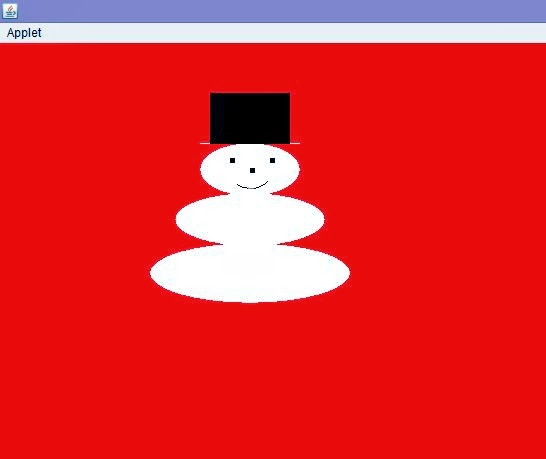
Snowman using Java Applet

import java.awt.*;
import java.applet.*;
public class appletimg extends Applet
{
public void paint(Graphics g)
{
setBackground(Color.red);
//setForeground(Color.white);
g.setColor(Color.white);
        g.fillOval(150,200,200,60);
        g.fillOval(175,150,150,53);
        g.fillOval(200,100,100,53);
        g.fillRect(200,100,100,1);
         g.setColor(Color.black);
        g.fillRect(210,50,80,51);
        g.setColor(Color.black);
g.fillRect(230,115,5,5);
g.fillRect(270,115,5,5);
g.fillRect(250,125,5,5);
g.drawArc(230,115,40,30,230,100);
}
}
/*<applet code="appletimg" width=500 height=500></applet>*/

OUTPUT

Saturday, March 8, 2014

Indian Flag using java applet


/*How to make indian Flag using applet*/
import java.awt.*;
import java.applet.*;
public class Flag extends Applet
{
public void paint(Graphics g)
{
g.fillOval(60,450,120,50);
g.fillRect(110,60,10,400);
g.setColor(Color.red);
g.fillRect(120,80,150,30);
g.setColor(Color.white);
g.fillRect(120,110,150,30);
g.setColor(Color.green);
g.fillRect(120,140,150,30);
g.setColor(Color.black);
g.drawRect(120,80,150,90);
g.setColor(Color.blue);
g.drawOval(180,110,30,30);
int a=0;
int x=195,y=125;
double x1,y1;
double r=15;
double d;
for(int i=1;i<=24;i++)
{
d=(double)a*3.14/180.0;
x1=x+(double)r*Math.cos(d);
y1=y+(double)r*Math.sin(d);
g.drawLine(x,y,(int)x1,(int)y1);
a+=360/24;
}
}
}
/*<applet code ="Flag" width=1368 height=678></applet>*/


//credits : Priyanandan Alok , KIIT University